VIDEO TUTORIALS
PRODUCT
What is the difference between low voltage and 12 volts?
Low voltage refers to any voltage below 50 volts. Therefore, 12 volts is classified as low voltage.
When do you use 12-volt garden lights?
12-volt lighting can be used in any garden, whether large or small.
Why choose 12-volt garden lights?
- No electrician is required for installation, as it’s easy to install everything yourself.
- Unlike a 120/230-volt system, the cables do not need to be buried at least 50 cm under the ground.
- It is very safe for children and pets.
- It is easy to expand and quick to connect.
Does 12 volts give off less light?
No, the voltage used does not directly affect the light output of a light source. The number of lumens indicates the amount of light a lamp produces.
What is a lumen?
The number of lumens corresponds to a lamp’s light output. The higher the lumen value, the more light the lamp provides. Our lighting products offer a higher lumen output than most fixtures on the market.
What are wattages?
Wattage refers to the electrical power used. With incandescent lamps, wattage was often used to indicate brightness. However, with the advent of LEDs, brightness is now measured in lumens.
What IP ratings matter when choosing my garden lighting?
Depending on where you want to place your lights in the garden, you can choose the appropriate IP rating to ensure your lights keep shining, no matter the weather. Some IP values you should know:
- IP44: Handles minor water splashes. Ideal for lights exposed to light rain but not direct jets of water.
- IP65: Protects against powerful water jets from all directions. Perfect for lights exposed to heavy rain or located near fountains.
- IP67: Suitable for lights close to the ground or at risk of temporary submersion. Dust-tight and submersible for short periods.
- IP68: Designed for permanent submersion. Ideal for underwater lighting in ponds or swimming pools.
Our lighting products are IP67 rated.
Does the switch remember its status if the power is lost?
Yes, the switch retains its status if the power is lost.
Does the light source remember its status if the voltage drops?
Yes, the light source retains its status when the power is lost. Once power is restored, it resumes its previous state (e.g., brightness or color temperature).
INSTALLATION
Can you combine 120 V lighting with 12 V lighting?
You cannot connect a 12 V lamp to a 120 V system, or vice versa.
What do you need in the garden for 12-volt lighting?
Besides 12-volt lighting, you need a transformer, main cables suitable for outdoor use, and waterproof wire connectors.
Can 12 V lighting be connected to a normal power socket?
No, 12-volt lighting should be connected to the transformer, which can then be plugged into a standard power socket.
Why do you need a transformer?
A transformer is needed to convert the 230 volts from the power socket into 12 volts. The low-voltage lighting system won’t work without it.
How do you determine which transformer you need?
By adding up the wattages of all your lamps and accessories, you get the total load. Based on this, you choose a 24 W, 100 W, 150 W, or 300 W transformer.
Does the 12-volt system have to be connected to an earthed power socket?
No, the transformer can be connected to any standard power socket, whether earthed or not.
How many metres of cable do you need?
This depends on your lighting plan. Look at where the power socket is and then where you want to place the lights. The cable must be long enough to run from the power source to each light.
How to choose the main cable?
Connect the fixtures to a main cable rated for outdoor use—SPT-3 type with a minimum temperature rating of 60°C. Choose the appropriate wire gauge based on the longest distance between the fixture and the transformer:
- 8 AWG: up to 250 ft (76 m)
- 10 AWG: up to 150 ft (45 m)
- 12 AWG: up to 100 ft (30 m)
Can you extend the cable?
The main cable can be extended using waterproof wire connectors. However, it’s not recommended to extend the cable attached to the fixture itself. Instead, it’s best to place the main cable as close to the fixture as possible.
How many lamps can you connect to a cable?
The number of lamps you can connect to a cable does not depend on the cable, but on the total wattage supported by the transformer.
Does the cable have to be buried?
Yeismooi’s lighting system operates on 12 volts, which is low voltage. Low-voltage cables do not need to be buried. Make sure the cables are placed safely, to avoid damage from shovels or animals chewing on them.
Can you leave the cable loose in the garden?
Yes, you can choose to leave them exposed or conceal them under soil, gravel, or tiles. You may also run them along the back of a garden border to keep them out of sight.
When do you use the cable distributor?
The cable distributor can be used if you don’t have enough connection points in your wiring system. It allows you to connect three lights to one point. You can also use it at the transformer, enabling two or three main cables to run directly from it. Alternatively, use the distributor to branch out from a connection point where a lamp is already connected—by placing the distributor in between, you can connect the lamp and an extension cable at the same time.
Does the cable/transformer always have to be powered?
The transformer must always be connected to an active power socket for the lights to work.
SMART
What is Wi-Fi?
Wi-Fi is a technology that allows devices to connect to each other over a wireless network. Wi-Fi uses radio waves instead of cables to provide high-speed wireless internet access.
What is 2.4 GHz Wi-Fi?
2.4 GHz refers to the frequency band at which the Wi-Fi signal is transmitted. Wi-Fi on the 2.4 GHz band has many benefits, such as a strong signal that can pass through walls, doors, and ceilings. This provides greater range.
Our products only support 2.4 GHz and do not work on 5 GHz networks.
What is the difference between 2.4 GHz and 5 GHz?
The 5 GHz band has a shorter range compared to the 2.4 GHz band because higher frequencies have a harder time penetrating solid objects. In contrast, the 2.4 GHz band offers longer range but at lower speeds. The 5 GHz band provides higher speeds, which are useful for tasks like video streaming. However, this has no added value for Yeismooi products.
Does device pairing also work on 5 GHz Wi-Fi?
No, device pairing requires a 2.4 GHz Wi-Fi connection.
Can you also connect via Bluetooth?
During device pairing, your phone must be connected to a 2.4 GHz Wi-Fi network and have Bluetooth enabled simultaneously. For daily use, YEISMOOI lights communicate via Thread Mesh rather than Bluetooth.
What is Thread? And how is it different from Wi-Fi?
Thread is a low-power, wireless mesh networking protocol designed specifically for smart home and Internet of Things (IoT) devices. Unlike traditional Wi-Fi, which relies on a central router, Thread allows devices to communicate directly with each other in a mesh network—extending coverage and improving reliability. This makes it especially suitable for outdoor garden settings. Thread is secure, responsive, and energy-efficient, ideal for smart lighting, sensors, locks, and other connected devices.
Wi-Fi, by contrast, is designed for high-bandwidth applications like video streaming and web browsing. It offers faster data speeds but consumes more power and relies on a single central access point. Thread is slower but far more power-efficient and scalable for smart home ecosystems.
What are the benefits of Thread?
Thread creates a robust and reliable mesh network where communication hops from device to device, increasing range and resilience without relying on a single access point. This makes it especially effective for outdoor garden environments. Thread is also optimized for low power consumption, making it ideal for battery-powered devices.
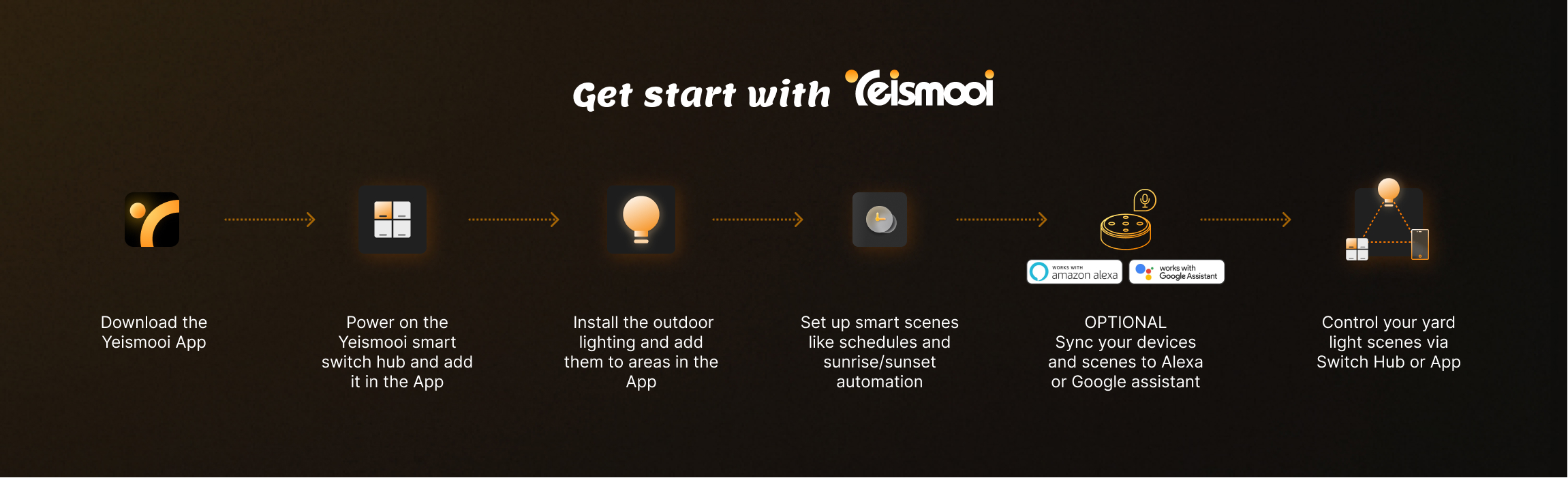
Why do you need a smart switch hub?
- It allows you to control multiple light scenes with button clicks (without openning App).
- It allows you to enjoy Alexa & Google voice control.
- It creates lighting mesh network that supports for better coverage of yard lights.
Do you have to pair the YEISMOOI Switch Hub first and then the light?
Yes, pair the Yeismooi Switch Hub first before adding the lights to the app.
Why is it failed provisioning Yeismooi lights in the App?
You must provision a Yeismooi Smart Switch Hub first.
How do I reset my switch hub?
- Automatically enters pairing mode on first power-up.
- To manually enter pairing mode: Press and hold the top-left and bottom-right buttons simultaneously for more than 10 seconds (with the power cable facing up). When the four indicator lights flash in a blue circular pattern, it enters pairing mode.
- If the Switch Hub is deleted from the Yeismooi App, it will automatically enter pairing mode when powered on.
- Pairing mode will last for 2 hours.
How do I reset my smart lights?
- Automatically enters pairing mode on first power-up.
- Turn the lights on and off 5 times, keeping it on for 3 seconds each time before turning it off.
- Or delete the device from the Yeismooi App.
- Pairing mode lasts for 2 hours, and the light will flash in a breathing pattern.
On which devices can I use the Yesimooi app?
The Yeismooi App works on most iOS and Android phones.
Why do my devices sometimes show offline in App?
- Switch Hub:
- Please check your WiFi network connection.
- Keep your Switch Hub closer to WiFi Router.
- Lights:
- Check whether the Switch Hub is online and connected.
- Make sure your lights is within distance from the Switch Hub.
My Yeismooi App is having trouble connecting to my device — how can I fix this?
If your app is having trouble communicating with Yeismooi devices that you’ve already added to your system, try the following steps:
- Check if another family member accidentally deleted the device.
- Ensure all devices are powered on. For offline lights, verify that the Switch Hub is powered and online.
- Refresh the Yeismooi App by pulling down the home screen.
- If the device still isn’t found, manually enter pairing mode and select “Add Device” in the app.
- If problems persist, contact support at support@yeismooi.com.
Can I control devices via a 4G / 5G mobile network?
Yes, once devices are added in the Yeismooi App, you can control them remotely via 4G/5G. If your phone is on the same Wi-Fi network as your devices, local control is enabled automatically for faster performance.
Can I control lights even when my home WiFi network is down?
Yes, you still can control lights even when they are shown offline in the App under below circumstances:
- When your mobile phone connects to the same WiFi as the Switch Hub, the WiFi is currently not connected to the internet:
- The existing schedules on devices would work automatically.
- The existing manual controls (scenes) would still work via both mobile App and Swich Hub Buttons.
- But you cannot create any new scene or schedule unless your home WiFi resume normal.
- When your mobile phone is on mobile network:
- App control may not work as the devices have no more access to internet.
- You can control lights only via Switch Hub Buttons with the bundled scenes.
Can I assign one light to multiple zones?
No, a light can only be assigned to one Zone (e.g., Front Yard or Back Yard), but you can include it in multiple scenes.
How do I set up dusk-to-dawn scenes?
- Click here to watch the how-to video.
- Open the Yeismooi App: Ensure the Switch Hub and lights are added.
- Go to the second tab “Scene” > “Recommend”, then select “Turn off lights at sunrise” or “Turn on lights at sunset.”
- Choose the lights and set actions, such as gradually turning on the lights over 15 minutes to 75% brightness and 3000K color temperature.
- Save the scene.
Note: These scenes will automatically calculate adapative timing based on which city you are located, so ensure the app has location permissions enabled for accurate timing.
How many scenes and schedules can I create within the App per home?
Up to 15 schedules and 30 scenes per home.
How close do I need to be to the Switch Hub to control my lights?
Thanks to Thread, you don’t need to be close. Just sign in to the Yeismooi App and control your lights from anywhere.
How far does the Yeismooi solution reach?
It can cover up to approximately 70 meters, depending on your home environment and obstacles. While Thread enables a broader, more robust, and reliable mesh network. Two Switch Hubs for a large house can be considered due to typical home environments and physical barriers(e.g., separate front and back yards).
What is Voice Control or Voice Assistant?
Voice Control allows you to control lighting devices and scenes using voice commands. Yeismooi supports Alexa and Google Assistant. Learn more here.
Can I use Alexa or Google Voice Assistant to control my lights?
Yes, you can. Please refer to this page for more details.
How to enable Alexa skill of Yeismooi?
Yes, you can. Please refer to this page for more details.
Why isn’t my Yeismooi light showing up in the Amazon Alexa app?
Follow the steps on this page.
How to sync up scenes in Alexa App?
Currently, the scenes created in Yeismooi App cannot automatically sync in Alexa App. Instead, you need to ask “Alexa, please discover new scenes” and the scenes will be synced up in Alexa.
Why aren’t scenes created in the Yeismooi App showing in Alexa?
Try refreshing the Alexa App or say “Alexa, please discover / sync up scenes”. You will later find them in Alexa.
Why aren’t scenes created in the Yeismooi App showing in Google Assistant?
Google Assistant does not support for showing scene list but you can still enable it via voice control.
CUSTOMER SERVICES
What is the recommended solution to start with your yard design?
It is recommended you purchase a starter kit that contains 1 * swtich hub and 2 * spotlights. You can add more spotlights depending on your house arrangement. Click here to purchase.
Where can you find user manuals?
User manuals are included in the product packaging. Alternatively, you can download the digital version from this website or via the App. The App download steps are as follows: tap any device card → tap “…” icon in the top-right corner → go to “Device Setting” → tap “Product Manual”
Where can you order Yeismooi products online?
You can order them here
I can’t find my question, what now?
Just send us an email at support@yeismooi.com, and we’ll get back to you as soon as possible.
What are the warranty conditions?
View Yeismooi’s warranty conditions here.
The warranty has expired, what now?
You can still contact us regarding any issues with your system by sending an email to support@yeismooi.com. We’ll work with you to find a suitable solution.

Smart Light. Elegant Outdoors. Your Style.
Contact Us
support@yeismooi.com
Monday – Friday
8AM-6PM(CST)
APP Download


Copyright © 2025 Lingying (Shanghai) IoT Technology Co., Ltd. · Yeismooi
 Yeismooi Smart Lighting System for Yard – Lingying (Shanghai) Internet of Things Technology Co., Ltd.